Troubleshooting My Singing Monsters Karaoke
The most-reported launch-week complaints and how to fix them without writing a ticket to Big Blue Bubble.
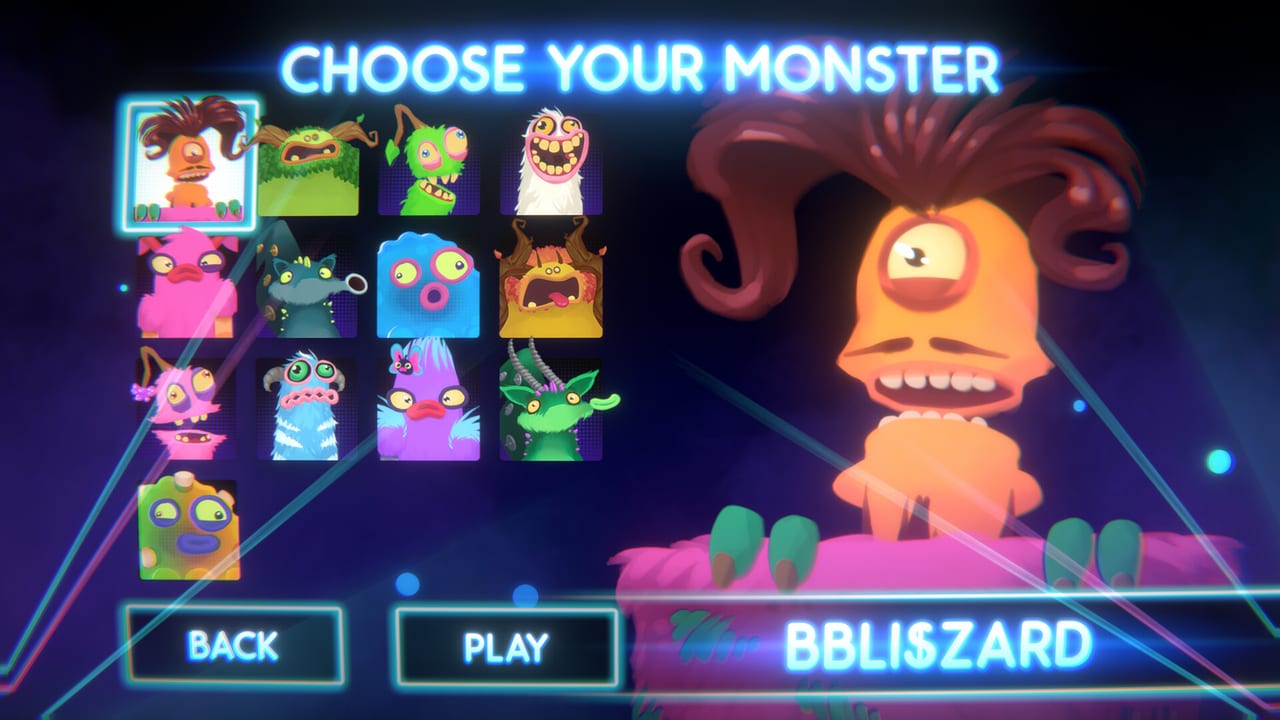
This page collects the things players actually ask about My Singing Monsters Karaoke after a week on Steam. It is not a patch list and it is not a copy of Big Blue Bubble’s Helpshift queue. It is the field guide for the launch build. If your problem is not here, the FAQ probably catches it. If it is here, the fix is usually free and does not involve editing files.
The toy is small, so most complaints are about either how it loads (chart files, audio, controllers) or how it scores (judges, ribbon, slide feel). Both groups get a section below. The video embedded in this page is the community’s import walkthrough; it is the most-watched single tutorial right now and answers three of the questions below before you read them.
Imports: charts that do nothing
The chart is in the picker but has no audio. Open the chart folder. Karaoke expects the audio file (usually an ogg or wav) to live in the same folder as the chart file. If your antivirus quarantined the audio the moment you downloaded it, the importer silently loads the chart with no sound. Open the chart folder, look for the matching audio file, and whitelist that file with your antivirus before you import again.
The chart does not appear at all. Some zips nest the chart one or two folders deep. Karaoke reads only files that sit directly inside the folder you point at. Unzip the pack, then point at the inner folder that contains the chart file plus the audio. Avoid pointing at a folder that only contains another folder.
The chart appears but some notes are out of range. Charts made for other pitch-slider games can include notes that sit above or below Karaoke’s playable ribbon. The note is on the file, not in the engine. Move on; chasing an impossible chart does not improve your ribbon. If you want to know which notes were dropped, load the same chart in a different pitch client and compare.
TromboneDB files sometimes load, sometimes fail. That is the expected behaviour on launch day. Test one file per session. The chart import checklist has a printable version of the same workflow.
Imports: audio mismatches
My audio file is too quiet inside Karaoke. Music and character volume sliders are the only in-game knobs. If the audio is quieter than the menu SFX, drop Windows volume to about 80 percent first, then push the music slider to maximum. You can always raise Windows; you cannot un-ring a loud menu click.
My imported track has a different pitch than the chart. Charts made for Trombone Champ sometimes assume a wider range than Karaoke draws. If the chart sits one octave off, you will hit the right buttons but feel like you are singing into a tin can. That is the chart, not your input. Drop the file and pick another from the same database.
Controls and Steam Input
My gamepad does nothing in the menu. Open Steam Big Picture, find My Singing Monsters Karaoke in your library, and add a controller configuration. Map a single analog axis to pitch. Avoid mapping pitch to a digital hat; the result is a staircase on a slide. The controls reference is the short table. The Steam Deck guide is the handheld version.
Pitch drifts when I am not touching the stick. That is usually axis drift on a worn controller. Open Steam Input, add a small deadzone, and try again. If you only have one gamepad, dedicate it to Karaoke so a racing preset from another game does not steal your axis mapping on launch.
My PAX-style flight stick maps to nothing. Steam Input does not auto-bind unusual axes. Open the configuration, manually pick the lever axis, and save a per-game profile. Steam Input keeps per-game profiles separate by default.
Judges and scoring
I missed the ribbon but still got three check marks. That is possible. The judges score the whole run, not every micro-correction. Trust your eyes on the ribbon for skill, but do not panic if the judges are kinder than you expected.
I stayed glued to the ribbon and only got two check marks. Also possible. The scoring is famously opaque; Steam reviewers called it vague from day one. The scoring guide walks through what the wiki can observe and what we will not invent.
There is no hit flash. Confirmed launch behaviour, not a missing mod. Watch the ribbon and the Monster’s face, not a sparkle that is not there. The known issues page lists this as a persistent request.
Audio and the loud menu
Menu clicks are louder than the music. Lower Windows volume before you open the launcher. Inside the game, push the music slider up and the character volume slider to taste. If a slider does not help, mute the Steam overlay and try again. The sound settings page has the long version.
My imported track is silent but the rest of the game plays. The audio file is missing, quarantined, or pointed at the wrong parent folder. The chart import checklist walks through each failure mode.
DLC and the character grid
I claimed Day One Pack but Rare Furcorn is missing. Restart the Steam client, then launch the game. The free Rare lives at the far end of the character grid on most resolutions; scroll the row before you assume it failed.
I bought Rare Pack but only see a few of the seven Rares. Same as above. The new faces are at the far end of the row. UI built for eight faces does not always resize for fifteen.
Steam Family Sharing hides my DLC. That is Steam’s DLC rule, not Karaoke’s. Check the store page; shared libraries cannot access DLC the owner did not buy.
Startup and crashes
The game will not start on an old laptop. Confirm Windows 10 minimum, 4 GB RAM, DirectX 11, and 2 GB free disk. The system requirements page has the full list. If the spec matches and the game still fails, run the launcher as administrator once; some users reported this resolves first-launch asset errors.
The launcher opens then closes. Restart Steam fully (right-click the tray icon, then Exit). Relaunch Karaoke. If the launcher still closes, verify the install files in Steam, then check Helpshift from the Links Hub.
My save file appears lost after a crash. Karaoke saves to the Steam userdata folder, not a cloud sync. If Steam Cloud is enabled in your settings, the next launch will replay the cloud copy. If Cloud is off, your save lives only on the local disk. The Family Sharing and Remote Play guide covers the cross-machine scenarios in detail.
When to escalate to Big Blue Bubble
Reproducible crashes deserve a Steam discussion title with your OS, GPU, and whether DLC is installed. A short clip helps. The wiki can only write the map; we cannot receive logs. The Links Hub has the Helpshift URL. The known issues page is updated when Steam news fixes an item; we do not pre-announce patches.
If your issue is “the game is too short,” that is scope, covered in the review. If your issue is “my friend cannot join,” that is single-player, covered in the multiplayer guide and the new Family Sharing guide. If your issue is “I want diamonds,” that is the collector game, covered in the Codes Hub.
Related hubs
Guides Hub for the rest of the tutorial set. Tools Hub for printable checklists and references. Updates Hub for the launch-week patch log and known issues. Links Hub for Steam, Helpshift, Discord, and the Big Blue Bubble press contacts.
A troubleshooting page is honest only when it admits what it cannot fix. This page cannot fix the missing hit flash, the missing Workshop, or the missing difficulty labels. Those are product gaps, not bugs. Everything else in this list has a workaround that costs you five minutes, not a ticket.
Frequently Asked Questions
Quick answers to the most common questions.
Why does my imported chart have no audio?
The ogg or wav file is missing, quarantined by your antivirus, or pointed at the wrong parent folder. Open the chart folder, whitelist the audio file, then re-import.
My chart does not appear in the picker. What now?
The zip probably nests the chart one folder deep. Unzip it and point Karaoke at the inner folder that contains both the chart file and the audio.
Some notes are out of range. Is that a bug?
No. Charts from other pitch-slider games can sit above or below Karaoke's playable ribbon. The note is on the file, not the engine. Drop the chart and pick a different one.
Why are the judges vague?
Steam reviewers noticed it from day one. Big Blue Bubble has not published a hidden scoring formula. Trust the ribbon; the judges score the whole run.
My gamepad does nothing in the menu. Help?
Open Steam Big Picture, find Karaoke in your library, add a controller configuration, and map one analog axis to pitch. Avoid digital hats.
I claimed Day One Pack but Rare Furcorn is missing.
Restart Steam and the launcher. Rare Furcorn lives at the far end of the character row on most resolutions; scroll before you assume the claim failed.
Where do I send a crash log?
Big Blue Bubble Helpshift via the Links Hub. The wiki cannot receive logs.