My Singing Monsters Karaoke Guides Hub
Tutorials for the free Steam karaoke stage, from first note to imported charts.
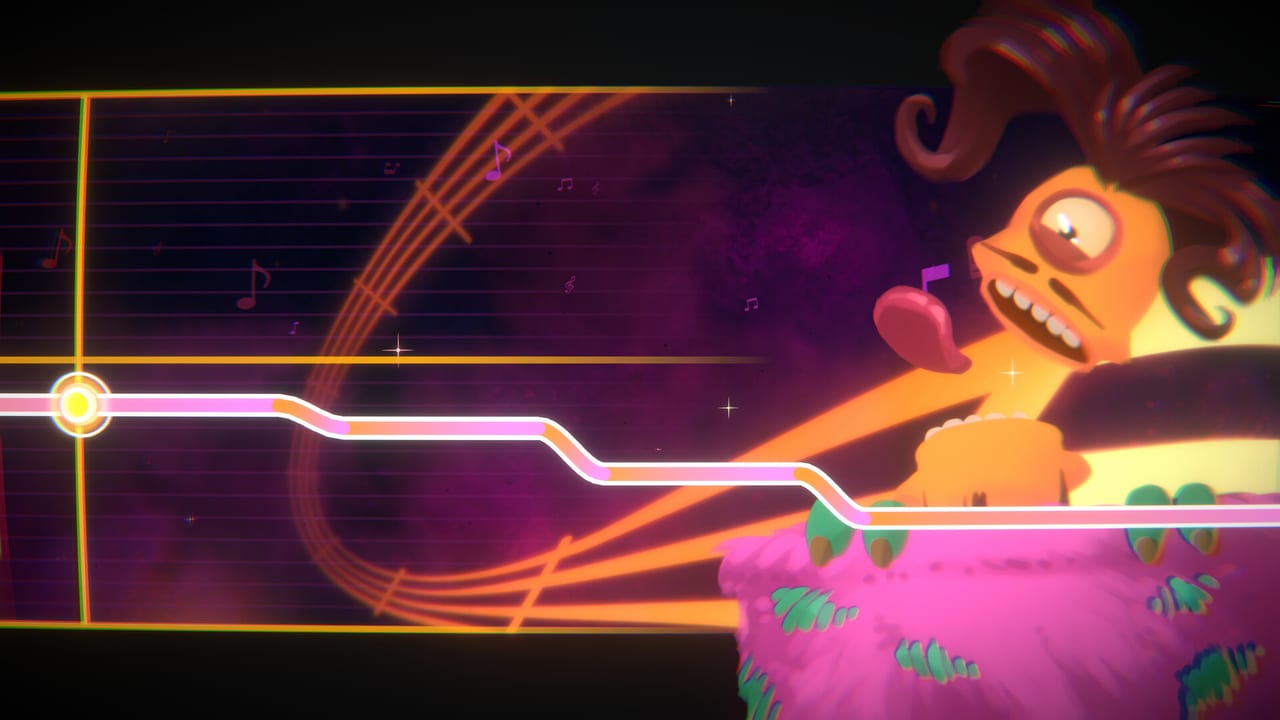
This Guides Hub is the map for My Singing Monsters Karaoke, the free Windows rhythm mini-game Big Blue Bubble released on Steam on August 19, 2026. You do not sing into a microphone. You steer pitch and timing while a Monster performs, and the joke is that a clean line looks cute while a messy line looks unhinged. If you arrived from the mobile collector, park that instinct: there is no island builder, no breeding, and no diamond shop here.
Start with How to Play if the note highway still looks like Composer. Jump to importing custom songs when the bundled island tracks feel short. Use controls before you blame the chart, then scoring when the judges shrug. The Steam Deck guide is for handheld players Valve marked Unsupported. Karaoke vs mobile is for anyone who expected breeding, island codes, or Composer. The achievement guide and the Steam review sit beside those tutorials so you can decide how serious you want to be.
How to play without confusing it for karaoke night
The store copy talks about hitting notes and conducting chaos. In practice you ride a pitch lane that can slide instead of only hopping between stacked Composer blocks. Community footage showed connected green lines, island folders such as Cold Island and Amber Island, and remix titles mixed in with classic beds. Your job is to keep the singer near the ribbon. Going off-script is allowed; the Monster still vocalizes, and the squash-and-stretch animation is half the reason the toy exists.
A first session should be tiny. Install from Steam, pick one Monster from the launch roster, and finish one official track before you touch imports. Watch how late slides feel compared with jumps. If the input feels greasy, read the controls reference rather than downloading twenty charts.
Custom songs, controllers, and the thin official setlist
Replay value is the import folder. Big Blue Bubble advertised compatibility with fan chart databases. Steam reviews quickly named Trombone Champ ecosystems, TromboneDB-style packs, and charts whose note range does not fully fit Karaoke. That is not a moral lecture; it is a practical warning. Follow import custom songs and tick the chart import checklist so you know why a file silent-fails.
The store also teases a custom controller. PAX demo players used flight-style sticks. DLC copy lists Partial Controller Support. Deck owners reported extra fuss, and Valve marks Deck Unsupported. None of that is hidden DLC: it is input preference plus a handheld warning. See Steam Deck. Pair that page with system requirements if a potato PC is the blocker, not your rhythm.
Scoring, achievements, and an honest review
Judges exist. A transparent combo meter like a ranked fighter does not. Players complained that hits lack a crisp flash and that songs lack difficulty labels. We refuse to invent a hidden formula. Perfect score explains what you can observe, how to practice, and which Monster tier picks are about fun rather than e-sports.
Steam lists 14 achievements. Highlighted names include Pitch Perfect, Can’t Get Enough, and one badge per launch singer. Can’t Get Enough matches player reports of putting the game down for a week. That is a design wink: this is a short toy. The review covers charm, length, missing Workshop, and the Trombone Champ argument without turning the wiki into a flame war.
How this hub links the rest of the wiki
Guides answer how. The Monsters Hub answers who sings. Tier List Hub ranks feel, not pay-to-win. Codes Hub exists because searchers type codes: Karaoke has none, but the Day One Pack is the free unlock people actually want. Updates Hub tracks the August 19 launch and known issues. Links Hub points at Steam, Big Blue Bubble, Discord, and Helpshift.
Read this wiki as a fan companion, not a patch notes feed. When Steam or BBB change import behavior, we update the import guide first, then this hub’s pointers.
Use the tutorials in any order. New players should chain How to Play, controls, then one official island song. Chart hunters should chain import, checklist, then song picks. Completionists should chain Day One Pack, achievements, then Rare Pack only if they like the faces.
What we will not invent
We will not publish fake redeem codes, unofficial difficulty numbers, or a full Rare Pack roster beyond names BBB printed (Rare Mammott, Rare PomPom, Rare Sox, plus four unnamed Rares). We will not pretend Karaoke is a mobile port. We will not tell you Trombone Champ charts are guaranteed legal or guaranteed compatible. We will tell you how the Steam toy actually behaves in August 2026.
If a paragraph here feels thin, open the child guide. This hub is the table of contents with enough context that you never land on a dead-end card.
Frequently Asked Questions
Quick answers to the most common questions.
Which guide should I open first?
How to Play if you have not finished an official song. Import custom songs if the bundled setlist already feels small. Controls if the pitch lane feels stuck.
Do these guides work on Steam Deck?
The game is a Windows Steam title Valve marks Unsupported on Deck. Play is possible but fiddly; read the Steam Deck guide before you farm achievements handheld.
Is there a microphone mode?
No. You control the Monster's pitch and timing. The performance still plays if you miss; it just looks weirder.
Where do DLC and codes fit?
There are no redeem codes. Claim the free Day One Pack for Rare Furcorn, then compare DLC packs if you want more singers.