Tips and Tricks for My Singing Monsters Karaoke
What the community learned after two weeks of playing badly on purpose.
Two weeks of Steam reviews, Discord clip threads, and living-room couch sessions produced a short list of things that make My Singing Monsters Karaoke better than a random first hour. This page is the collected output of that community learning. It assumes you finished How to Play and have run at least one official track. If you have not, open that guide first.
None of these tips change the pitch engine. They make the existing engine more fun, more readable, and less likely to waste your evening on a broken chart.
Ribbon habits that actually help
Start with connected notes, not stacked blocks. Community gameplay footage showed green lines that hold across slides. Beginners often treat every note as a tap. Slides are holds. When the ribbon rises, your job is to hold your position, not chase the line with tiny taps.
Sit closer to the screen than you think you need to. The pitch ribbon is thin. A chair pushed back from a large monitor turns every micro-correction into a guessing game. Bring your face within two feet of the display on a laptop, or use windowed mode at 75 percent scaling on a desktop.
Play one song until the ribbon feels boring before you import. If you can hum the contour of Plant Island while looking at the ceiling, you know the ribbon well enough to spot a bad import. If you cannot, the failure is your ear, not the chart.
Deliberate disaster runs teach more than clean runs. Playing badly on purpose shows you exactly how far off-line the Monster will go before the animation breaks. That ceiling is your comedy budget. Knowing it helps you decide when a miss is still funny versus when it ruins a recording.
Monster selection wisdom
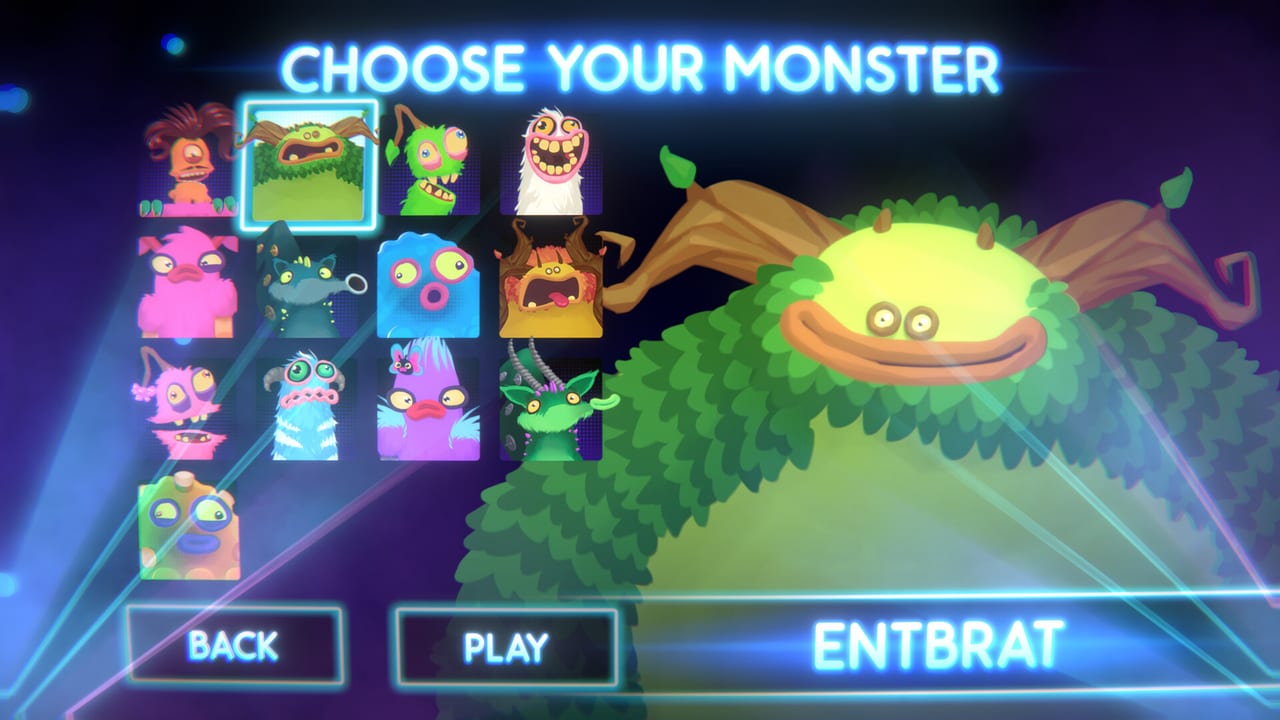
Match the voice to the track mood. A belty Entbrat on a cute remix is a joke. A whisper-soft Furcorn on a Wublin bed is also a joke. Mixing character and music creates a tone, and the judges react to the pairing.
Sox and PomPom are the most readable vowels. If you are still learning which direction is up, pick a Monster with clear vowel sounds on the pitch extremes. You will hear the note before you see it fall off the ribbon.
BBli$zard is the marketing spike but not the easiest pick. Cold Island material with a celebrity cameo is the trailer fantasy. Playing it cleanly requires the same ribbon skills as every other singer. Do not expect an easier chart because the face is famous.
Hover the character grid before you start. The Monster squash animation plays on hover. It does not start until you confirm a song. Use that two-minute hover to pick a face that matches the track you already chose.
Import habits worth keeping
One new chart per session, maximum. A bad import ruins your calibration. If you load five charts at once, you will spend an hour not knowing whether the ribbon is drunk or the file is broken. Load one, play it twice, retire it or keep it.
Keep a works folder and a broken folder. Your memory is the index. When a chart from a Trombone Champ pack works, you want to remember which pack that was. When it fails, you want to know it failed without hunting the zip name six months later.
Check antivirus quarantine before re-downloading a silent chart. Heuristic scanners flag ogg files routinely. If your chart has no audio on import but played fine in another client, your antivirus is the culprit.
Range mismatches are not your fault. A note that sits above the playable ribbon is a file problem, not a practice problem. Move on. Chasing an impossible chart does not improve your ribbon skills.
Session setup for a better time
Bind pause to a keyboard key you can hit without looking. The joke faces are the content. Accidentally leaving the ribbon mid-song while you talk is also content. A dedicated pause key is the difference between a clean clip and an apology tweet.
Claim Day One Pack before your first session. The free Rare Furcorn appears in the character grid after you claim the DLC and restart the client. Running the picker before you claim means looking at eight faces twice. Claim first.
Windows volume at 80 percent before you open the menu. The menu SFX is louder than the music for most players. Drop Windows volume first, then set in-game sliders to taste. You can always raise Windows; you cannot un-ring a loud menu click.
Use headphones on a shared machine. The Monster vocalizations are funny in context and grating out of context. Headphones keep the comedy private and the household peaceful.
Steam Deck specific habits
Dock and bind one analog axis before you go portable. The on-screen keyboard fights the DLC claim screen. Finish all menus at the dock with a keyboard, save a Steam Input profile named after the game, then try undocked.
Right trackpad or left stick, not both. Pitch on one consistent axis. Switching between trackpad and stick mid-session resets your muscle memory. Pick one and commit for the evening.
Disable gyro unless you already have a stable axis. Gyro on a moving train adds noise to a signal that needs precision. Turn it off until you have a session where gyro would genuinely help a small correction.
Community etiquette when sharing
Do not mirror packs marked for specific loaders. Chart authors spent time on files aimed at particular clients. Respect the intended loader. If a pack asks you not to import it into a different client, that is the author’s right.
Do not paste TootTally branding onto your own guides. BBB had to remove this branding after launch. Give credit to the original tools without copying logos that were already retracted.
When posting clip highlights, note which chart and Monster you used. A clean run means more when viewers can reproduce it. Saying “PomPom on a Cold Island remix” gives more useful context than “look at this random successful run.”
Signs you are done for the night
Can’t Get Enough exists for a reason. The achievement that asks you to leave the game alone for days is BBB telling you the toy is small by design. If you finished the eight singers and one official track, you have seen the core content. Custom charts extend the runtime. Leaving the client is a feature.
If every import fails, stop importing. Day one of chart hunting is not calibration time. Play official island music until the ribbon feels boring, then import tomorrow. A night of failed zips does not improve your pitch skills.
If the judges stop making sense, the ribbon is still right. Scoring opacity is a known launch complaint. Trust your eyes on the ribbon more than the judge faces. If the line looks clean, the run was clean.
Related pages for continued learning
How to Play for the first-hour loop. Controls for input mastery. Scoring for what the judges are actually measuring. Review for the honest take on why the joke ends faster than you expect. Achievements for the badges that survive a short session. Updates for the launch-week list that explains why some of this advice is still work in progress.
The best tip that does not fit a list: play badly on purpose and laugh. That is the entire product.
Frequently Asked Questions
Quick answers to the most common questions.
Should I practice on official songs or imports first?
Official songs. Learn the ribbon on a track you can hum before you import charts from other pitch games.
Why does my imported chart have no audio?
The ogg file is missing, quarantined by antivirus, or not next to the chart file in the same folder.
Can I use gyro on Steam Deck for tiny corrections?
Yes, if your axis is already stable. Turn gyro off on a moving train or when it adds noise instead of help.
When should I stop playing for the night?
When the Can't Get Enough achievement exists as a design choice, the toy is telling you it is small. Trust that.