My Singing Monsters Karaoke Multiplayer, Couch Co-op, and Family Sharing
Short answer: it is single-player. Here is the long answer about couch turns, Family Sharing, and Discord clip trading.
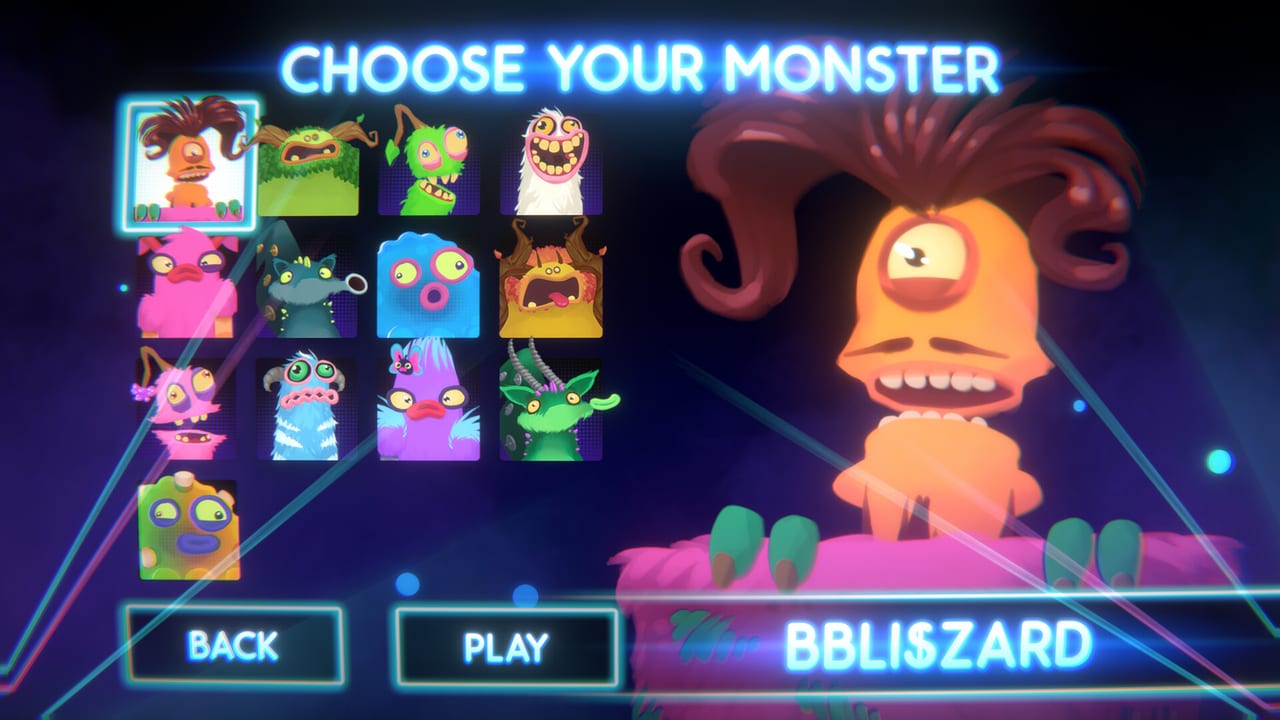
My Singing Monsters Karaoke is single-player. Steam lists it that way in the API block we copied; the base app categories read Single-player, Steam Achievements, and Family Sharing. There is no online match, no leaderboard, no split-screen arena, and no asynchronous duet mode. If you arrived from the mobile collector expecting multiplayer, the mobile game has a friends list and a visits system that Karaoke does not inherit.
That single-player stamp is honest. It also answers a question that arrives in Steam discussions every week: how do I play with my friend? The answer is three flavors of multiplayer that are not, strictly, multiplayer. This page explains them.
Couch turns on one keyboard
The cheapest way to play with another person in the same room is to pass the keyboard. There is no second-player picker; whoever is at the keyboard is the singer. The character grid still has to be re-selected between turns because the menu does not remember the last pick. This is annoying for a couch crowd. It is also the only sanctioned local experience.
If you have a second controller, Steam Input can rebind it for a second pitch axis, but Karaoke does not support two singers in the same song. The second axis would compete with the first on the same ribbon and the Monster would vibrate like a phone on a table. One device at a time is the rule, not the suggestion.
For a smoother couch flow, queue a playlist of three short songs, write each player’s name on a Post-it, and rotate. Twenty minutes of that rotation is more Karaoke than most players will see in a week.
Steam Remote Play together
Steam’s Remote Play Together lets you stream your local game to a friend over the internet and let them play on your machine. Karaoke is a candidate because it is single-player and uses keyboard input, both of which Remote Play handles cleanly. The remote player gets your keyboard, your screen, and your audio. The pitch ribbon behaves identically.
There is no built-in support for two ribbons on one machine. Remote Play is one-to-one, not one-to-many. Use it for friend-tutoring, not for online karaoke. The remote player can pick a different Monster than the host’s last pick, which is the closest thing Karaoke has to a duet.
Steam Family Sharing
Family Sharing lets a second Steam account borrow a primary account’s library. The base Karaoke client works under Family Sharing in the same way other single-player Steam games do. DLC follows Steam’s rules. The shared account gets the base game plus DLC entitlements only when the primary account is not playing. The shared account cannot play the same game as the primary at the same time; Steam locks the second instance.
For Karaoke specifically, Family Sharing is useful for a kid whose parents own the base game on the family PC. The kid gets the eight free singers and Rare Furcorn if the parent claimed Day One Pack. Rare Pack is a parent decision; the kid sees it only if the parent’s account owns the DLC.
If the kid wants to play simultaneously with the parent, that does not work. Family Sharing is sequential, not parallel. For parallel play on the same machine, you would need two Steam accounts both purchasing the base game separately, which is silly because the base game is free.
Discord clip trading is the closest thing to a leaderboard
Because there is no native online play, the community uses Discord to trade short clips. A thirty-second video of a clean run is the closest Karaoke has to a high score. The Links Hub points at the official Discord invite used in BBB’s video descriptions. Most servers keep a clips channel where you can post a screenshot of your best run, brag about a perfect slide, or trade pack recommendations.
This is community infrastructure, not game infrastructure. If you wanted official leaderboards, the known issues page collects the related complaint that scoring is already opaque. Until scoring itself becomes public, leaderboards are impossible by definition.
What about Steam Workshop sharing?
Steam Workshop would let you upload a custom chart once and have a friend subscribe to it. Karaoke has no Workshop. Custom charts are local files. You cannot share a chart with a friend through Steam; you have to send them the zip out-of-band, on Discord, on a flash drive, or by uploading to your own hosting. That limitation is the most common multiplayer-adjacent request in launch-week reviews.
The import guide explains how to send a friend a pack manually. The chart checklist is the same advice whether you are importing for yourself or for someone else. Folder hygiene is the only shared protocol.
Why this is by design
Big Blue Bubble framed Karaoke as a single-player toy from day one. The PAX booth version was a single singer’s gag. The Steam client is that booth gag with a Steam overlay. Adding online multiplayer would change the project scope from a single-mood joke to a small networked game, which would inflate the budget, push back the release, and probably change the cartoon tone.
That said, the review notes that players asked for everything from leaderboards to online co-op. If a future Steam news post adds either, this page shrinks. Until then, treat multiplayer as three honest workarounds on top of a single-player toy.
Related reading
How to Play for the first-hour loop. Achievements for the badges you can earn solo. Links Hub for Steam, Discord, and Helpshift. Known issues for the persistent Workshop and online play requests. The Karaoke vs mobile page covers why your mobile friends list does not transfer.
If you wanted a real online karaoke game, the review is blunt about the rest of the ecosystem. Karaoke is a pitch-slider toy. Multiplayer happens off to the side, in Discord, in living rooms, and in Remote Play sessions. Treat that as the multiplayer design.
Frequently Asked Questions
Quick answers to the most common questions.
Can I play Karaoke with a friend online?
Not natively. Steam lists the base app as single-player. Use Steam Remote Play Together for tutoring or Discord for clip trading.
Does Family Sharing work?
Yes. The base client is shareable. DLC follows Steam's usual rules: the shared account inherits entitlements, but two accounts cannot play the same library at the same time.
Is there split-screen?
No. The game has one ribbon and one character picker. Couch play means passing the keyboard.
Can I share my custom charts with friends?
There is no Steam Workshop. Send your chart zips out-of-band through Discord or a file host.
Will online play be added later?
Players asked. Nothing confirmed. This page will update if Steam news ships it.